MQTT Export Module
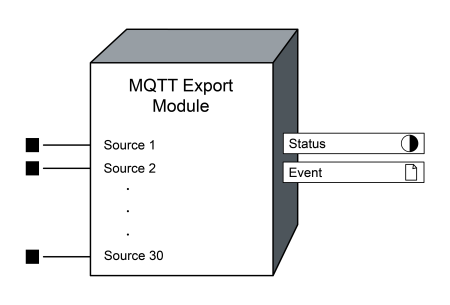
The MQTT Export Module lets you publish continuous half-cycle data to an MQTT broker.
Module icon

Overview
The MQTT Export module is a high-speed module that records data and publishes it to an MQTT broker. Approximately every second, the module publishes accumulated half-cycle values and their units. The module uses the Status register to indicate if there is an active connection between the meter and the broker. You can configure the module to connect to a broker with or without authentication.
Note: The registers and settings available in this module depend on the device or node you are configuring, as well as its firmware and template versions. Not all registers or settings are available on all devices or the Virtual Processor, and labels might vary.
Inputs
 Source
The values that will be published to the MQTT broker; you can connect up to 30 Source registers.
Note: You must link at least one Source input for the module to operate. Linking additional Source inputs is optional.
Setup registers
 MQTT Broker Address
A valid IPv4, IPv6, or fully qualified domain name (FQDN).
Note: If you enter a FQDN for the Broker Address, the meter connects to the broker using its IPv4 interface. To connect using IPv6, enter an IPv6 Broker Address.
The default port is 8883; if the broker's port number is different, you can change the default port by adding :<port number> to the end of the IPv4 or IPv6 address. For example, 169.254.1.11:8884.
Client ID
A unique 1–23 character string used to identify the meter's connection to the broker.
Use any combination of valid characters:
-
Uppercase letters (A–Z)
-
Lowercase letters (a–z)
-
Numeric (0–9)
-
Hyphens (-)
Username
The Username used to authenticate with the broker.
A valid Username:
-
Has 1–255 characters.
-
Uses printable ASCII characters (0x20–0x7E).
-
Does not have any leading or trailing spaces.
Note: To connect without authentication, leave Username and Password empty.
Password
The Password is an encrypted write-only register used to authenticate with the broker.
A valid Password:
-
Has 1–511 characters.
-
Uses printable ASCII characters (0x20–0x7E).
-
Does not have leading or trailing spaces.
If you connect to the broker with authentication, upgrading the meter firmware or applying a new template will remove the stored MQTT Password.
notice
Loss of communication
Ensure that you re-enter the MQTT password after upgrading firmware or applying a template.
Failure to follow these instructions can result in loss of communication.
Output registers
 Status
Indicates the status of the connection between the meter and the broker:
-
True: The meter is connected to a broker.
-
False: The meter is not connected to a broker.
 Event
Event
All events produced by this module are written to this register.
The following table lists possible events generated by the module and their associated priority.
| Event priority group | Priority | Description |
|---|---|---|
| Setup Change | 10 | Input links, labels, or setup register values have changed. |
The Event output register stores the following information for each ION event: timestamp, event priority, cause, effect, and any values or conditions associated with the cause and effect.
Detailed module operation
This section includes details on the payload data format.
Payload details
The MQTT Export Module publishes batched measurements in a JSON formatted payload.
Overview
Each payload contains:
-
Meter Name -
Meter IP Address -
Sampling information:
-
Sequence Numbers -
Timestamps (ISO 8601) -
Timestamps (Unix microseconds)
-
-
Input meta data (identifying information for the values):
-
Labels -
Units
-
-
The data published from an upstream ION output register:
-
Values, shaped asValues[inputIndex][sampleIndex]
-
Detailed payload example and field descriptions
Example payload with added line breaks and comments.
{
  "Meter Name": "ION9000-789ABC",
  "Meter IP Address": "192.168.0.1",

  "Sequence Numbers": [
    33230,
    33231,
    33232,
    33233,
    ... // One for each value in the Values arrays (~120)
    33366
  ],

  "Timestamps (ISO 8601)": [
    "2026-01-30T21:44:17.252073Z",
    "2026-01-30T21:44:17.260406Z",
    "2026-01-30T21:44:17.268739Z",
    "2026-01-30T21:44:17.277073Z",
    ... // One ISO 8601 timestamp for each value in the Values arrays (~120)
    "2026-01-30T21:44:18.385412Z"
  ]

  "Timestamps (Unix microseconds)": [
    1769809457252073,
    1769809457260406,
    1769809457268739,
    1769809457277073,
    ... // One timestamp for each value in the Values arrays (~120)
    1769809458385412
  ]

  "Labels": [
    "HS Vln avg",
    "HS I avg",
    "HS kW tot",
    "HS kVAR tot",
    ... // One label for each input
    "HS kVA tot",
    "N/A" // Unconnected inputs report label "N/A"
  ],

  "Units": [
    "V",
    "A",
    "kW",
    "kVAR",
    ... // One unit for each module input
    "kVA",
    "N/A" // Unconnected inputs report units "N/A"
  ],

  "Values": [
    [0, 0, 0, 0, ...],
    [0, 0, 0, 0, ...],
    [0, 0, 0, 0, ...],
    [0, 0, 0, 0, ...],
    ... // One array for each module input, ~120 values per array
    [0, 0, 0, 0, ...],
    ["N/A", "N/A", "N/A", "N/A", ...] // Unconnected inputs report values "N/A"
  ]
}| Key name | Array description | Length |
|---|---|---|
Meter Name
|
The meter's Ethernet device name. For more information, see Ethernet Device Name in Communications Module. | 1
|
Meter IP Address
|
The meter's IP address (IPv4 or IPv6 depending on the MQTT Broker Address). | 1
|
Sequence Numbers
|
Use the sequence numbers to help confirm that the data is continuous. | N
|
Timestamps (ISO 8601)
|
Value capture time in ISO 8610 UTC format. | N
|
Timestamps (Unix microseconds)
|
Value capture time as the number of microseconds that have elapsed since the Unix epoch (January 1, 1970, 00:00:00 UTC). | N
|
Labels
|
Associated labels for each input. Unconnected inputs will report the label as "N/A". |
M
|
Units
|
Associated units for each input, if applicable. Unconnected inputs will report the units as "N/A". |
M
|
Values
|
Two dimensional array of values recorded for each input. Unconnected inputs report "N/A" for all values. |
M ⨉ N |
Payload parsing tips
-
Count inputs:
M= the length ofLabelsorUnits. -
Count samples:
N= the length ofSequence Numbers,Timestamps (ISO 8601), orTimestamps (Unix microseconds). -
Use the input and sample lengths to loop over the dimensions of the
Values[M][N]array. -
At sample
s, use the time fromTimestamps (ISO 8601)[s],Timestamps (Unix microseconds)[s], and sequence number fromSequence Numbers[s]. -
For input
i, useLabels[i]andUnits[i]. -
The recorded value for
Labels[i]at samplesisValues[i][s]withUnits[i].